


Garmin has recently launched a new range of watches with built-in solar panels, allowing battery life to be extended using solar energy. I have tested the Garmin Fenix 6 Pro Solar, and in this article, I will cover all the watch's key features.
I've had the watch for several months, and in this test, I will delve into its SOLAR functions, the built-in solar panels that can extend battery life. But it will also be a walkthrough of 6 model, showcasing what it can do.
Garmin Fenix 6 Pro Solar has the same basic functions as
, named something like Garmin Fenix 6 Pro or Garmin Fenix 6 Sapphire. I have listed all the watches here:
Garmin Fenix 6S Pro, Garmin Fenix 6 Pro, Gamin Fenix 6X Pro
Garmin Fenix 6S Sapphire, Garmin Fenix 6 Sapphire, Gamin Fenix 6X Sapphire
Garmin Fenix 6S Pro Solar, Garmin Fenix 6 Pro Solar, Gamin Fenix 6X Pro Solar
Garmin Fenix 6S vs. Fenix 6 vs. Fenix 6X
All watches in
, named with “6S” are the smallest physically. The diameter of the watch face is 42 mm.
Watches named “6” (without anything following) are medium-sized physically. Here, the diameter is 47 mm. This is the size I have.

And watches named “6X” are the largest physically. Here, the diameter is 51 mm.
The larger the watch, the larger the screen, and there are also some differences in battery life, with the largest watches having larger batteries than the smallest and thus have longer battery life. But functionally, the models can do the same, whether they are named Fenix 6S, Fenix 6, or Fenix 6X.

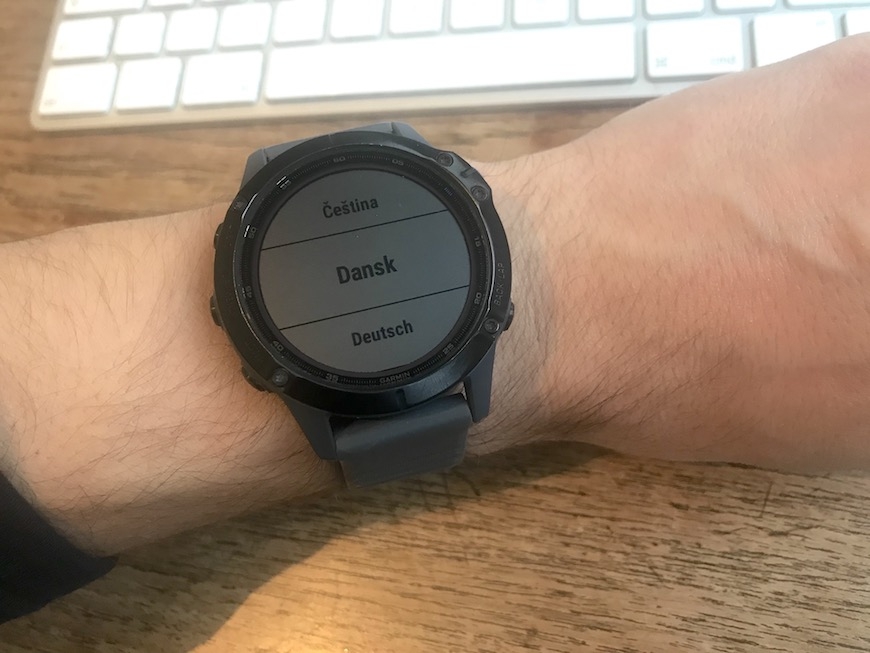
Language on Garmin Fenix 6
As you will see in this article, my watch is set to English. It's something I've just gotten used to, but you can, of course, also set it to Danish or any other language.
A World-Class Multisport Watch
I've primarily tested the running functions. But I guarantee you, no matter what other sport you might take on, you won’t lack data. This watch is for you if you generally don’t compromise on gear and want the best of the best in multisport watches.
Clearer Screen on Garmin Fenix 6 Solar vs Fenix 6 Sapphire
The first thing I noticed when I put on the Fenix 6 Pro Solar was that the screen, compared to the Fenix 6 Sapphire, is easier to read when outdoors. I hadn't previously thought that the screen on Fenix 6 Sapphire was hard to read, and it isn’t as such. But when you place the two watches side by side, there is indeed a noticeable difference. The sapphire glass on the Fenix 6 Sapphire reflects a lot, which the glass on the Fenix 6 Pro Solar almost doesn’t.
Left: Garmin Fenix 6 Sapphire. Right: Garmin Fenix 6 Pro Solar.
The glass on Fenix 6 Pro Solar is called Corning Gorilla Glass. It’s the same screen glass type found on almost all newer . It has excellent scratch resistance, but it's not quite as scratch-resistant as the sapphire glass on Fenix 6 Sapphire, which is almost impossible to damage.
Impressive Battery Life in Garmin Fenix 6 Series
Garmin’s Fenix 6 series is already known for having a very long battery life (read more in our inspiration universe - see for example about the Solar series.) But as something new, this edition of Fenix 6, Garmin Fenix 6 Pro Solar, is equipped with built-in solar panels that can extend the watch’s battery life further. All Garmin watches named SOLAR have this feature.
calls the screen technology “Power Glass.” And if you look closely at the image below, you can actually see the solar cell as this 1 mm thin ring (marked with the red arrows), going all the way around the outer edge of the screen. Moreover, there is also a transparent solar cell covering the whole screen, which is completely invisible to the naked eye. The solar cell that forms a ring around the screen is 10 times more efficient than the “hidden” solar cell covering the rest of the screen.

Left: Garmin Fenix 6 Sapphire. Right: Garmin Fenix 6 Pro Solar.
has provided some values for battery life in the new SOLAR watches, assuming optimal solar conditions. But in an everyday life like mine, where I spend a lot of time indoors, it’s clear that conditions aren’t optimal!
So, I set out to find out how much difference the Solar technology really makes regarding battery life when I use the watch in a regular day-to-day setting.
For 14 days, I wore both a 6 Sapphire and a Garmin Fenix 6 Pro Solar and subjected them to exactly the same conditions. Excluding the extra contribution from the solar cells in Fenix 6 Pro Solar, the two watches have the same battery capacity on paper.
The result of my little test will be revealed at the end of this article.
Garmin Fenix 6 - Walkthrough
But first, I want to show you the key features found in the Garmin Fenix 6 series. I won’t go through them all because there are so many (!), but I will show you everything I personally use most often.
Starting with the home screen, you can see a lot of data displayed here, and you can customize it as you like. I have, for example, date, current altitude, steps, battery life, heart rate, and weekly kilometers run.

Additionally, there's a new SOLAR symbol on this SOLAR edition of Fenix 6, where the ring fills up more and more as you expose the watch to sunlight (in the image above, there's 100% intensity). And at the bottom of the screen, solar intensity is plotted over time.
Widgets in Garmin Fenix 6
From the home screen, if you start scrolling up or down, you'll come to the Widgets overview.
The first thing I encounter is a Solar widget, where I can see an overview of how much solar energy the watch has been exposed to over the last 6 hours. The same as I saw on the home screen.
Then there’s a weather app… An overview of sunrise and sunset…

A compass, altimeter, and barometer.

And then we get to some of the more running and training specific features...
Training Features in Garmin Fenix 6
In Garmin Fenix 6, you naturally get ongoing estimates of your VO2max and lactate threshold, which can give you an indication of whether your fitness is moving in a positive or negative direction.
And after each training session, you get an assessment of how the training has impacted your fitness.
Garmin Fenix 6 also includes all the more advanced training features like Training Status, Training Load, Load Focus, and Recovery Time. These features help you evaluate whether your training plan is well-balanced. Whether you have a good distribution between the different types of training you can subject your body to.






In the image below, we have Low Aerobic, High Aerobic, and Anaerobic training effect – and the small dotted boxes indicate the optimal range your load should be within. The watch can even suggest what type of training to do more of to improve your fitness positively.


Garmin Fenix 6 also features heat and altitude acclimatization, which can tell you how well your body has adapted to changes in temperature or altitude. This can be useful if you travel a lot, such as for competitions, and want to know when your body is ready to perform at its best.
There's also a "Race Predictor" or race calculator, where the watch estimates what you can achieve over various distances. The race calculator has become significantly more accurate in newer watches, but in my experience, you need to train consistently with the watch for several weeks and months before you start getting a somewhat accurate picture.
Latest Activities, Activity Tracking and Smartwatch Features
In the widget overview, you can also see your latest activities. In my case, it's mostly runs. Here you can see a lot of data about your run. You can see the physiological training benefit that this specific run has given you. You can see how your heart rate has been – distributed across the different heart rate zones. You can see lap times or kilometer times. And you can see a map of the run. And the elevation profile for the run.
Activity Tracking with Garmin Fenix 6
Besides these training functions, the Garmin Fenix 6 naturally also has all the activity tracking features you can imagine: Steps, distance, sleep, heart rate, floors, and calories, etc.
Here you can see heart rate, current stress level, and Body Battery, which is an indicator of the body's fatigue and energy level.
Garmin Fenix 6 also has a Pulse OX sensor. Here the watch measures blood oxygen saturation.
Calendar, Smart Notifications and Built-in Music in Garmin Fenix 6
There is a calendar function, smart notifications, and a music function. The watch has capacity for up to 2000 songs, and if you have a premium account with Spotify or Deezer, you can transfer music, podcasts, and playlists from here directly to the watch.

It's also possible to add more widgets among those already on the watch, but you can also download entirely new widgets in Garmin's Connect IQ store.
Control Menu and Settings
If I hold down the top-left button, the control menu opens.
Here I can, among other things, toggle battery saver mode on and off.
I can open my Wallet and use Garmin Pay to pay wherever contactless payment is accepted.
There are timers and alarms.
And I can quickly save my current location. For example, if I later want to navigate here.
In the control menu, there are also alternative time zones, and there's the "Find my phone" feature, which I can use to locate my phone if I can't find it.
You can also add other functions to the control menu if there's something else you use more often.
The general settings on the watch can be accessed by holding down the middle-left button. Here in the menu, you can configure all settings.
Activity Profiles
When I want to start an activity, I press the top-right button. Here you first see the preferred activity profiles that I have chosen myself – Running, Trail Running, and Mountain Biking. But it's possible to add a wide range of other profiles, as you can see here. Some of the new things here are Indoor Climbing, Bouldering, and Surfing.
Navigation and Maps
Here you also find Navigation. Fenix 6 has built-in maps, so you can navigate for many different things. For example, various points of interest and nearby locations. But the navigation features that I, as a runner, use the most are Back To Start, Courses, and Round-Trip Course.
Back to Start is smart if you've gone for a run and, for some reason, want the quickest way back to your starting point.
In Courses, you have the option to load a route that you can then follow. It can be one you create in Garmin Connect, or it can be a GPX file with route data that you load into Garmin Connect and then transfer to the watch.
Round-Trip Course is especially brilliant if you want to run a specific distance and you're not very familiar with the area you want to run in. You just enter how far you want to run, e.g., 10 km, which direction you want to start running in, e.g., east, and then the watch calculates 3 route suggestions, around 10 km (plus/minus), which you can then navigate through. Just like you know it from a car GPS.
You can also follow routes you've previously run. Or you can navigate by saved locations, a specific direction, specific coordinates, or you can mark a point on the map.
And there's also Expedition mode, which can track you if you're going on a longer trip over several days.
More Data Fields on Garmin Fenix 6
Under the various activity profiles, I have the option to make all sorts of settings for my running activity profile. For example, I can change my data fields. A new feature here in Fenix 6 is the ability to have up to 6 data fields in the same view here in Garmin Fenix 6 and Fenix 6S, while the larger version, Fenix 6X, can have up to 8 data fields on a single screen view. And I can easily decide which data I want to have displayed in the individual fields.

Just like you can download new Widgets and Watch Faces, you can of course also download new data fields in Garmin Connect IQ.
Interval Training and PacePro
It's also possible to create a simple interval training session directly on the watch. In this case, I've made 5x1000 m with a 2 min break in between. And when I start the run, the watch will guide me through the intervals.

If you want to make it a bit more advanced, you can create workouts in Garmin Connect, either on your phone or on the web, and then you can transfer the workout to the watch. Doing it this way allows for much more advanced workouts, and it's, for example, possible to determine how fastyou want to run at specific intervals, and the watch will tell you during the run if you're going too fast or slow, etc.

PacePro is one of the new cool features in the Fenix 6. You create a route in Garmin Connect, like a half marathon or marathon route, and set a desired finish time or average pace.
The genius part is that PacePro accounts for the route's elevation profile and guides you on how fast or slow to run each section to reach your desired finish time. In other words, it tells you how much faster to run downhill and slower uphill, optimizing your energy use for the best finish time.
When setting up the PacePro strategy in the Garmin Connect app, you can choose how hard the uphill effort should be. Personally, I prefer it to be relatively easy uphill so I can make up lost time downhill. I can also choose to run a “negative split,” meaning run faster as I get closer to the finish. Or vice versa. You can see how changes affect the split times you need to run.
Training suggestions – Daily workout suggestion
All watches in the Garmin Fenix 6 series received the new feature, Daily Suggested Workouts, recently introduced with the Garmin Forerunner 745.
With Daily Suggested Workouts, the Garmin Fenix 6 acts as your personal running and cycling coach, providing SPECIFIC recommendations for SPECIFIC workouts based on your current fitness level, training load, and sleep, stress, and recovery status. It's pretty brilliant, if you ask me.


Crash detection and tracking function
Like most newer Garmin watches, the Fenix 6 Pro Solar has this safety and tracking function that can send alerts to your contacts if you're unwell, have an accident, or feel unsafe and want someone to know your location.
You can manually press and hold the top left button for about 5 seconds to send the alert. But the watch can also send an alert if it detects a strong impact followed by no movement, like after a bike crash.
In either case, an alert with a live-track link is sent to your contacts so they know your location. It's a feature you hope never to need but handy to have. Note that this feature only works if the watch is connected to your smartphone and it's nearby. And Crash Detection only works when you've started an activity like a run or bike ride.
Battery life continued – Garmin Fenix 6 Pro SOLAR
Back to SOLAR and battery life.
A common misunderstanding is that the watch can be charged using the solar cells. It can't. It's not a practical solution for most, as it takes too long. You still need to charge the watch with the included USB cable occasionally, but the solar cells can extend the battery life, reducing the frequency of real charges. And that's what I've found in my unscientific test…
SOLAR's significance in smartwatch mode
To illustrate what the solar cells can do, I let the watch sit in smartwatch mode in direct sunlight on a clear day, and after 7 hours, the watch gained 2% extra battery. It shows that the solar cells can keep the battery level more or less constant (in Smartwatch-mode) as long as you expose the watch to sunlight. But it's obviously impossible to do all the time.
SOLAR's significance in GPS mode
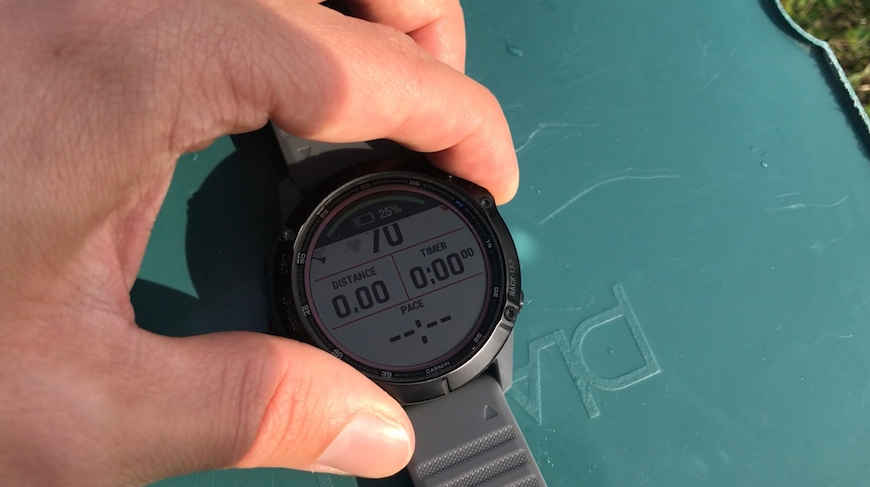
In another small test, I placed the Garmin Fenix 6 Pro Solar in direct sunlight on a clear day, started an activity with GPS enabled, and left it in the sun for 3 hours. The watch was charged to exactly 25%, as the SOLAR function doesn't activate when the battery is close to 100%, so I chose 25%.
After 3 hours, I charged the watch again to 25% and repeated the exact same test, but this time with the screen facing down, so SOLAR couldn't affect the battery level.
The result of my test was that the watch in full sun for 3 hours went from 25% to 19% (in GPS mode). While with the screen down (without SOLAR), it went from 25% to 19% (in GPS mode). What? No difference?
Images from Test WITH SOLAR solar charging
Ready for test - full sun:

Test started - Battery at 25%:
After 3 hours - 19% battery left:

There was 100% Solar intensity throughout all 3 hours:

Images from Test WITHOUT SOLAR solar charging
Ready for test WITHOUT SOLAR - Battery at 25%:

Test position:

After 3 hours - 19% battery left:

There was 0% Solar intensity throughout all 3 hours:

I've dug a bit more, and the best explanation I can come up with is that 3 hours isn't long enough to show a real difference. Looking at the numbers Garmin provides, they say the Garmin Fenix 6 Pro Solar in GPS mode lasts up to 36 hours WITHOUT SOLAR, and up to 40 hours WITH SOLAR. That's about an 11% increase in battery life in GPS mode under ideal conditions.
In my test, where Garmin Fenix 6 Pro Solar in shade lost 6% power, the watch in the sun should theoretically have lost about 5.4% power (an 11% improvement compared to shade). But since the difference is so small (under 1%), and since Garmin Fenix 6 Pro Solar shows battery level in whole numbers (without decimals), I see no difference in my test.
Perhaps the result would have been different if the test had lasted 8 or 10 hours. But anyway, we're down to small differences. I've seen other tests and reviews where people have observed significantly greater effects of Solar charging, but I can only conclude based on my own small study.
Battery life in everyday use
Using the Garmin Fenix 6 Pro Solar in a typical day where I spend most hours indoors, the Solar function has little impact on overall battery life in Smartwatch mode.
During the test period, I wore both a Garmin Fenix 6 Pro Solar and a Garmin Fenix 6 Sapphire, subjecting them to the exact same conditions. The Fenix 6 Sapphire (without SOLAR) ran out of power on the 10th day, while the Fenix 6 Pro Solar lasted about 12 more hours. That's about a 5% extension of battery life.
Over these 14 days, I ran 8 times, which obviously drained the battery, and I estimate I spent an average of 2-3 hours outdoors daily. And that's simply not enough to have a significant effect from the SOLAR function when living in Denmark (where it's not sunny every day). So I definitely haven't fully utilized the SOLAR function.
But from the individual tests I've conducted, I can see that the SOLAR function at least has the potential to extend battery life if you spend enough time outdoors (and the sun shines).
Garmin states that under ideal conditions, you can extend battery life in smartwatch mode by two days – from 14 days to 16 days. And by ideal conditions, Garmin means “3 hours daily with a minimum of 50,000 lux light conditions”.
To put that number in perspective, we're over 100,000 lux on a clear summer day - so the sun doesn't necessarily need to shine from a cloudless sky for SOLAR to have an effect. On a day with a thin cloud cover or a few passing clouds, I can still get full effect on the watch.
On what I would call a typical cloudy day, where I can't see the sun directly but can sense where it is, I get about 30% effect. And on a completely overcast and gray rainy day, there's zero effect.
Even though I have to honestly say that the effect in everyday use is very limited, I still think SOLAR is a pretty cool feature, which at least sends a good signal here in 2020/2021, where the climate battle has really come to the forefront. Even the smallthings count.
The Solar function can genuinely make a difference, as seen in another of Garmin's watches - namely Solar. Here, the solar cells cover a much larger part of the watch face, making the effect significantly greater. In smartwatch mode, under ideal conditions, more than a doubling of battery life can be achieved...
More inspiration?
Find more articles in our inspiration universe.