


Its a while ago that there was a watch which could challenge Garmin but COROS Pace 2 is undoubtedly one of the watches which is really capable of that.
I just tested COROS Pace 2 (latest model of the watch) and in this review I will go through the most important features of the watch - and why the watch is a top competitor to Garmins GPS-watches. I can certainly reveal that I truly love this watch - and actually currently use it as my watch for daily workouts.

But first of all, who is COROS?
Everybody is familiar with Garmin. But the same is probably not the case for COROS. I certainly hadn´t heard anything about COROS before, so of course it was a new and interesting "journey" to test the watch.
But let me start off by telling you about COROS and who they are.
COROS is a company which focuses on technology with sports performance. COROS want to help athletes train to be the best they can be. This is done through development of innovative technologies like COROS Pace 2, which provides endurance athletes with the best equipment they can rely on regardless of their challenges. The starting point for all their products is an advanced technology with an efficient and intuitive user experience - and I can only endorse that. That is certainly also my experience of COROS Pace 2.
COROS’ products are designed, tested and perfected for athletes by athletes. And the latest - and most impressive - athlete, which they have signed, is the marathon world record holder, Eliud Kipchoge. For the upcoming 2021 Tokyo Olympics he will be using COROS Pace 2, which is testament of the quality of the watch. If the world champion can use the watch, it must really be something special.

My first impression of the lightest GPS-running watch in the world, COROS Pace 2
I am not a marathon record holder, a world famous runner or an elite runner, but I have got to admit that it is an amazingly cool GPS-watch. Roughly speaking, COROS Pace 2 is a premium GPS-sports watch, the lightest GPS-watch in the market weighing only 29g. and it is certainly designed with road running and personal records in mind.
Its a GPS-watch with some of the new and already existing features, which covers all the basic needs of most runners and triathletes. The watch even has a number of features which you won´t even find in the top models of the competitors. I.e. COROS Pace 2 has an integrated watt/power meter which doesn´t require additional accessories. In addition the watch has a night training feature, i.e. the screen light is turned on automatically during workouts in between sunrise and sundown. And perhaps the most impressive and fascinating thing about the watch is the fact that all these extraordinary features are wrapped into the lightest version; 29g. says it all, it is really nothing.
I think that my previous watch Garmin Forerunner 645 Music is light but this watch is as light as air. You literally don´t notice that you are wearing it. And of course, the watch is produced in plastic and the watchbelt in silicone but that also means that the weight is kept at a minimum. Ïts so cool when you wear it during everyday life and for running. It has an amazing fit.

COROS Pace 2 – specific features
Before I go too far into the individual and most important features, then lets start off from the top and look at some of the most specific features of the watch.
COROS Pace 2 has integrated wrist-heart rate measurement with performance monitoring of running, cycling and swimming. In addition the watch also has a barometric altimeter, accelerometer, gyro sensor, compass, sleep tracking and smartphone notifications. And not least, Pace 2 may provide an advanced analysis of your workout according to VO2max, training effect, training load, threshold pace and much more.
I have listed the additional specific features below:
- Weight: 29g.
- Watch size: 42mm
- Screen size: 1.2"
- Operation: 1 scroll button + 1 reg.press button
- Battery normal mode: Up to 20 days
- Battery in full GPS-mode: Up to 30 hours
- Battery in Ultra Max-mode: Up to 60 hours
- Charging time: 2 hours
- Waterproof classification: 5 ATM (50 meter)
- Night training - automatic backlight on
- Options for track running
- Options for planning training and structured workouts
- Options for connecting Stryd wattmeter incl. all measurements
- Options for ANT+ and Bluetooth connection
- Options for tracking VO2max
The position of COROS Pace 2 according to Coros’ range
To provide a general insight into what type of GPS-watch COROS Pace 2 really is, it can be useful to compare the watch with the remaining watches in the COROS’ range.
The COROS’ watches can simply be ranked from the top model and down as in the list below:
1) COROS VERTIX GPS Adventure Watch
2) COROS APEX Pro Premium Multisport GPS Watch
3) COROS APEX 46mm Premium Multisport GPS Watch
4) COROS APEX 42mm Premium Multisport GPS Watch
5) COROS PACE 2 Premium GPS Sport Watch

(From the left: COROS Vertix, COROS APEX Pro Premium, COROS Apex 46mm Premium, COROS Apex 42mm Premium and COROS Pace 2)
The differences between the watches are primarily to be found in battery life, water resistance, weight, screen size and activity profiles.
Although COROS Pace 2 is placed last among the GPS-watches above, this doesn´t in any way mean that its features isn´t up to speed. In fact, the watch has basically all the same features as Coros’ top models except from the activity profiles, skiing, windsurfing, speedsurfing, mountain climbing and trail running. However, you can basically use the running profile for trail running.
And for most athletes, the rest of the profiles which COROS Pace 2 doesn´t have isn´t missed anyway. I certainly don´t, especially bearing in mind that the watch is primarilly focused around running.
Common for the COROS GPS-watches
However, all COROS watches have one thing in common. They don´t have smartwatch-notifications like payments with the watch or integrated playback which you will find in a number of the Garmin GPS-watches. Of course, its very individual if you use these features - or want them - but if I have to be honest, I never use the payment feature in the Garmin watches. However, I have really enjoyed the music feature in my Garmin Forerunner 645 Music, and I miss this feature somewhat in COROS Pace 2. I hope - and strongly believe - that COROS will update their watches in future versions, so this feature will be included. I certainly love being free of my mobile on my runs and just to be able to download the music directly to the watch and play songs directly from there via Bluetooth.
Last but not least COROS Pace 2 does not have the feature with a calculated race calculator as you will find in Garmin´s running watches. Its a feature which most people probably don´t regard as being important but for a dedicated runner like myself I think its a fun feature. However, I should mention that its not a feature that I miss in my daily use of COROS Pace 2, but rather during a couple of times a year. If its there, its great,. And if its not, its also ok.

COROS Pace 2 vs. Garmin Forerunner 245
As COROS Pace 2 is a new watch on the market - and neither the brand nor the watch - is especially recognized - its natural to make a small comparison to Garmin Forerunner 245, which seems to be the primary competitor to COROS Pace 2.
Both watches can be categorized as being "the best middle class-watches" within each brand. They offer a lot of the same features as the top models but they are less expensive.
Below I have done a direct comparison of the most important features in the watches, so its easier to spot the similarities and differences.
Table of comparison – COROS Pace 2 vs. Garmin Forerunner 245


Based on the table, its evident that the watches differ from each other in terms of battery-life, fitness- and smart-notifications.
COROS Pace 2 is perfect for the athlete who wants ;
- An affordable GPS-watch.
- A watch which can be used for hardcore running but also for multisports like triatlon.
- An impressive battery life.
- Options for measuring running watt/power directly from the watch, i.e. no need for extra accessories.
- Option for tracking your daily VO2max estimation via the app (Read-more in the app-chapter later)
Garmin Forerunner 245 (Music) is perfect for the athlete who wants:
- A dedicated running watch
- Option for playback directly from the watch
- Option for contactless payment
- More insights into fitness, including stress, oxygen-levels and VO2-max directly on the watch, etc..
Basic operation of COROS Pace 2
The first thing you notice in COROS Pace 2, is that the new scroll-button replaces the typical press-buttons. Its certainly a button that you either love or you don´t. First time I got the watch, I thought it was quite unusual, but I grew into a fan of it quite quickly. Simply because it provides a lighter design visually but also because it is super user friendly. Both for everyday life and during activity.
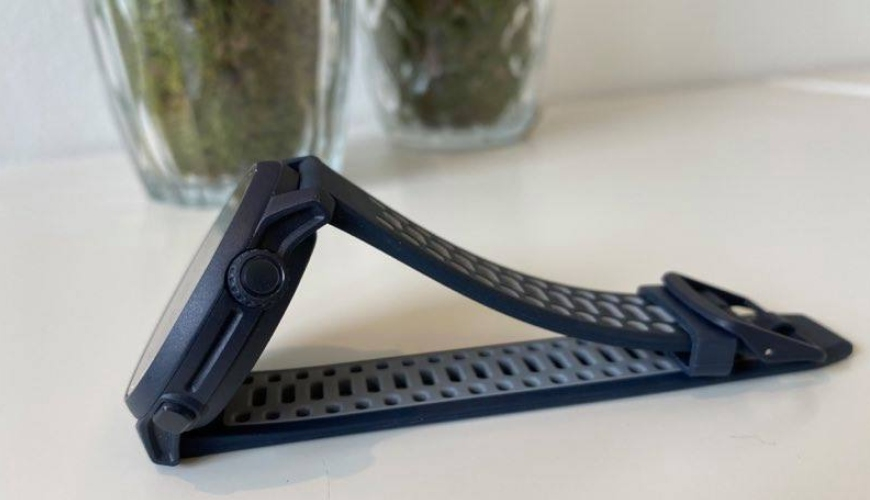
With this new scroll-button, you can say that the watch has 2,5 buttons. A regular press-button at the bottom to your right and the new scroll-button at the top to your right, which can rotate but also be pressed in. The scroll-button is go up/down in the menues (and between the different screens) as well as a "confirmation"-button by pressing it in
Possibility to scroll in the current data
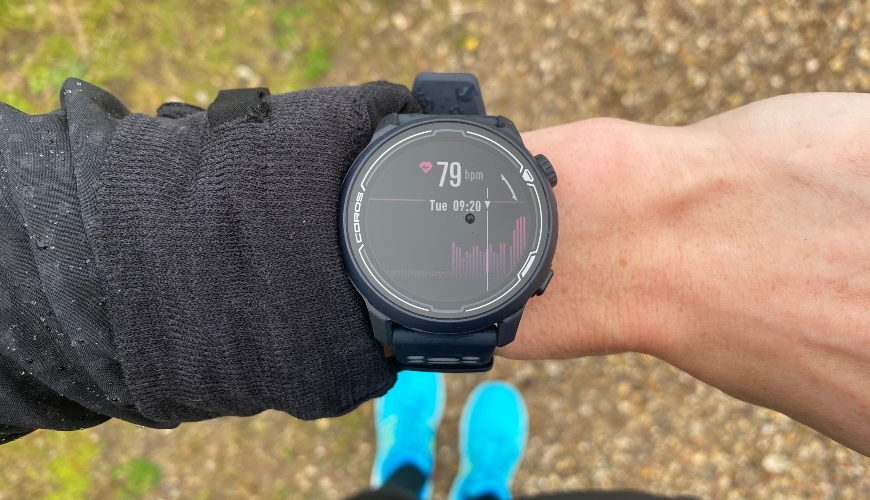
Via the scroll-button it is also possible to go back and forwards in data (for the current day) and among other things check out your heart rate during the day, etc..
Setting up the main menu in COROS Pace 2
The screen is not a touch screen but it is in color. The main menu (i.e. the primary screen) shows most of your data for the day, such as steps, total training time, heart rate, time, etc.. Its possibe to change the look of the main menu via the associated COROS-app for the watch. See the video below.
If you press the button at the bottom to your right, the small piece of text at the top of the screen change between data such as time for sunset or sunrise, battery percentage and stair climbing.

Likewise, if you press the bottom button to the right, you will see a small mini-control menu. Here its possible to find detailed information about the battery level, the actual heart rate, compass, stopwatch, alarms, night mode and change between the pre-selected screen shots (via the app) and much more.

As you can see in the videos and the pictures, its quite easy to operate the watch. Its super intuitive and doesn´t take much practise before you know all about navigating the watch.
COROS Pace 2 - choosing and operating activiy profiles
Now we proceed to how to operate the more training related part of the watch.
In this part it is also the scroll-button which provides access to the profiles of the watch. When you are at the main menu, you just need to press the scroll-buttons once and the menu will open with all the activity profiles. Here you can choose exactly the sport you want to do as well as other non sport-related menues, such as settings, AI-trainer (training history) and training programmes - if they are uploaded via the app. I will retun to the app later.
These features are of course related to sport, but they don´t actively start a sports activity. Here you need to select the sport in question by pressing a scroll-button and then everything will work out from there.
In total I will say that COROS Pace 2 has all the key features you need for a running watch or triathlon watch. There are many data fields to choose from and great options for connecting ANT+ or Bluetooth accessories. I.e. the the watch can super easy be connected to a Stryd-wattmeter, if you usually use that. Or a cycling wattmeter if you need to use the watch for cycling or triathlon.
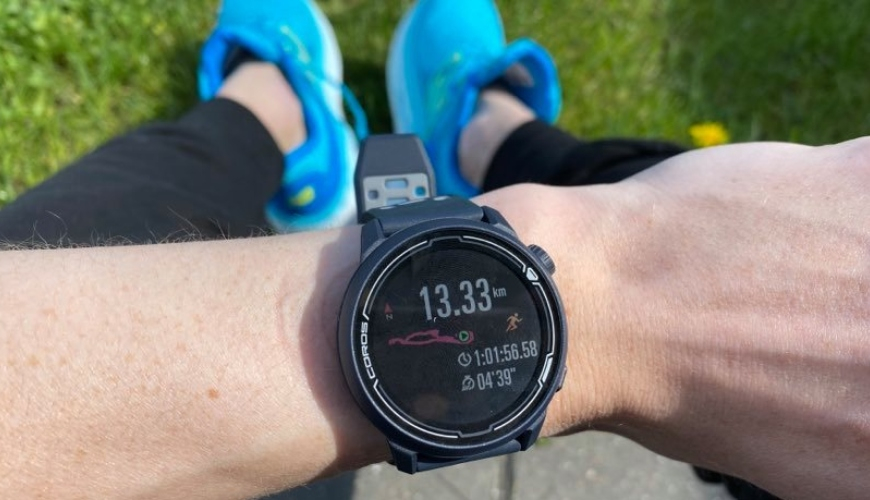
Starting a training session in COROS Pace 2
But lets start a training session. Its super easy. Just press the button at the top to your right to open the sports menu. Then you choose which sport you want to do by pressing the scroll-button.

When the watch has tuned into the GPS-signal and the heart rate measurement, you´ll hear a small beep and the activity will start. If the watch doesn´t pick up the GPS signal, it will provide a message like below.

There is also a simple interval-option which is set up based on a pre-defined repetition / pause definition as well as warmup/de-jog. Its very much like the competitors do it and very simple. But if you are into more detailed and advanced training sessions, its obvious to use the training planning feature (which I will get to later).
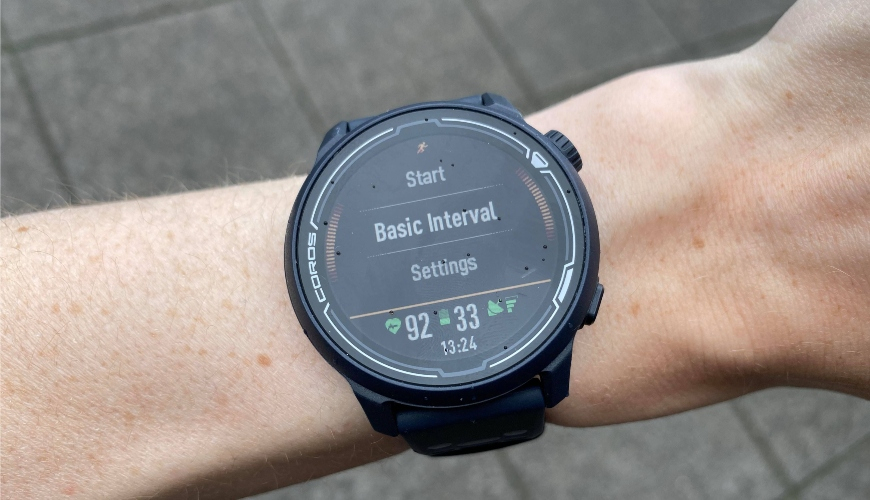
Regardless if you choose just to get going or the simple interval feature, you start the training by pressing the "start"-button and the watch will start tracking you run (or the activity you have chosen).
Data will be shown on your screen based on your pre-settings via the app (I will get back to that) and by means of the scroll-button, you can change between the different screens in the watch. Super simple.

COROS Pace 2 - Small screen but effective before, during and after your training session
In spite of the small size of the watch and the small screen, I had no trouble or challenges reading the data on the screen. Regardless of my pace. Everything is very clear.
NOTICE! The only thing that you should pay attention to - and which was very annoying the first time I used the watch - is the fact that the watch has a pre-defined screen lock. If you don´t use the watch actively, i.e. press the buttons or scroll between screens, the screen will lock. This feature can be turned off, both during training and in general. Its very annoying that the screen locks during a running session so you are not free to scroll between the different screens but need to unlock the screen every time.
How to unlock the screen is shown in the video below.
How to end a training session in COROS Pace 2
The scroll-button at the top to your right works both as a start/stop button while the button at the bottom to your right can be used for manuel lap. Its a pre-defined auto-lap, which I usually use for my easy-going, long runs, but if I have specific pacy blocks or do intervals, I turn off the auto-lap and do laps myself in accordance with the desired distance.
When you end a training session, you just press the scroll-button at the top to your right which pauses the training session. If you want to stop the session completely, you press the scroll-button for 3 seconds. You just need to follow what it says on the screen, its very easy.

COROS Pace 2 provides superb visual data insights after your training
Then you get a very cool look into your workout. Normally I think that Garmin provides a super summary of your workouts on the watch, but COROS sets new standards. Visually you are shown your average pace, altimeter, power, heart rate, etc.. Everything you can usually see in tables in the app after your workout, you can now see directly on the watch after your workout. Ingenious!
After the workout you get an indication of when your body is fully recovered and ready for a new training session just like in Garmin´s watches. This is shown in numbers of hours as well as in your current endurance-%.

The workout session will afterwards - and fully automatically - be uploaded to the COROS-app, where its possible to retrieve even further detailed info from your training session. This is very much similar to the options in the Garmin Connect app.
COROS Pace 2 makes it fun to run on a track
Just before I go into the ingenious and very user friendly app, I just want to make a few comments on the activity profile, track running. Its a super cool feature which the watch also has if you are used to doing a lot of training on track, intervals or specific track running.
Its super easy to use this feature on the watch. You just select the activity profile ”Track Run” and then you choose which track you are running on, if its lane nr. 1, 2, 3 etc..

A great tip would be to turn off the autolap, as the watch is pre-set to lap automatically after each mile. But if you are running on track, its an advantage to lap yourself according to if you are running 400m., 800m., or another distance.
You don´t have to do more or less than you usually do, but just run and lap when you have finished the interval in question. The watch will automatically adjust the pace according to the number of laps you have done. My colleague, Emil, tested the track running feature in the COROS Vertix, which works completely similar to COROS Pace 2. Read his test of the feature here.
The COROS-app – an ingenious platform
BUT! Its time to go into the ingenious Coros-app. Its via the COROS-app that all set-ups of the watch are made and where you upload all training sessions.
1) Main page
When you open the COROS-app, the main page below is shown with the most important activity statistics for the day. By swiping to the side (both left and right) its possible to see statistics from other days. On the current day, you will find the training completed as well as statistics in relation to your training load and fitness level. Its here that the watch will make a VO2max estimation which is only shown for the current day (but is calculated from the sum of previosuly completed training sessions)

Its super cool that the app (via the watch) makes a VO2max estimation, however, I miss to see the development over time according to how your VO2 max rises and drops according to your perfroemance. This was previously possible in Garmin – and I miss this feature a little in COROS Pace 2.
2) Activity page
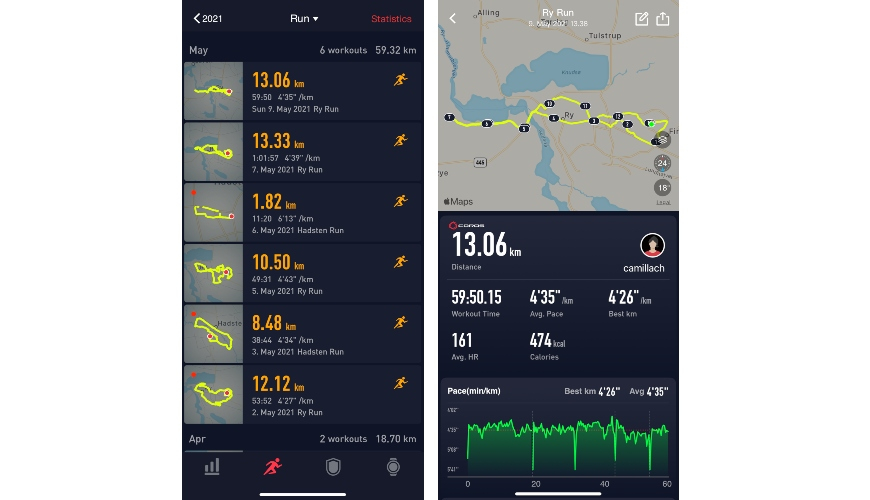
The next tab shows a complete list of your completed training session. Here its possible to press every single session if you want to see a more detailed statistic of the training session in question. This feature is very similar to the ”AI Trainer” feature in the watch where its also possible to get the exact same data shown, however, in the app its more visually transparent.
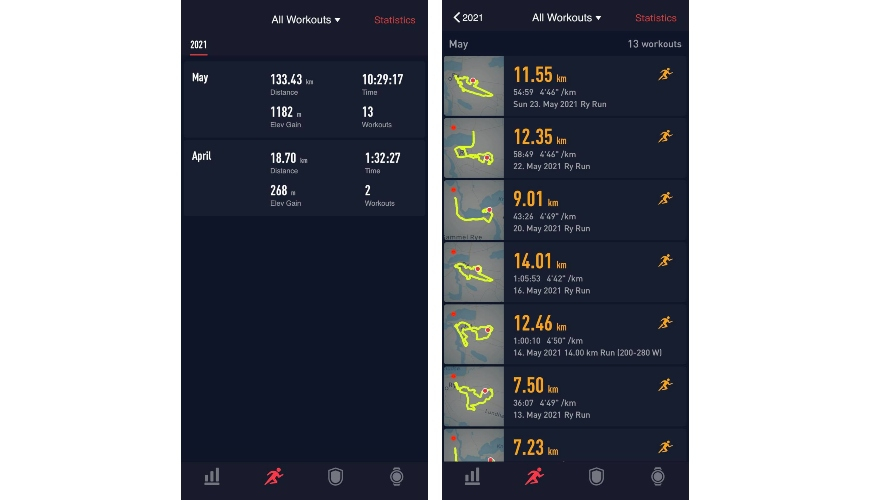
When you press the individual session, its also possible to press (again) on the individual graphs, if you want to compare all data to each other. For instance if you want to compare pace” and ”running power” on your run. This is just done by clicking on the individual fields at the top of the screen.

3) Profile tab
On the next tab, the profile tab, its possible to adjust/correct the typical configuration statistics like sex, weight, age and more and its possible to connect third party apps like Strava, TrainingPeaks etc.
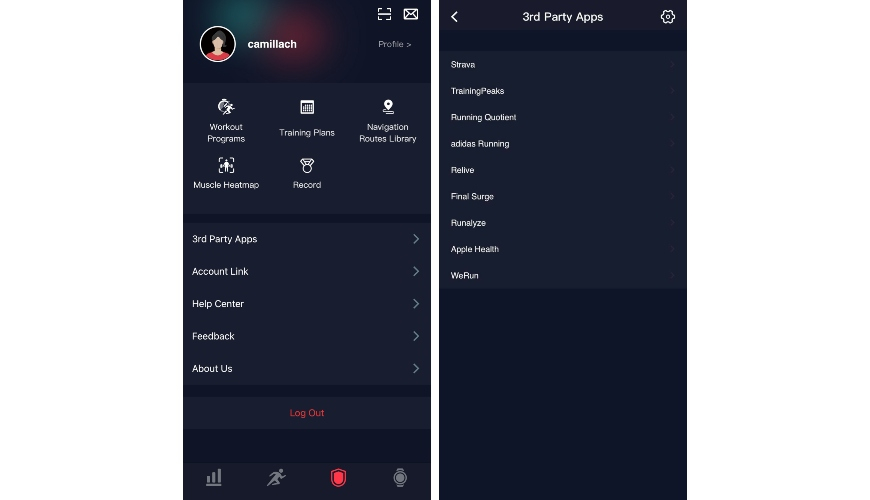
4) Setting up the watch
Finally you will find the tab for setting up the watch. Its under this tab that everything from data fields to dial to notifications will be adjusted according to your needs. At first glance, I would say that a lot of it is reminiscent of the Garmin Connect-app but still there are a number of options for settings which are a tad cooler.
In the COROS-app its possible to specifically choose which notifications you want. Personally I think its nice to choose what you want to be "disturbed" by in your workouts either during training or during everyday life.

Perhaps the coolest set up feature in the COROS-app is the setup of data fields under the individual activity profiles. Its rare to find something as user friendly as this and visually luxurious. It was never easier to figure out which fields you want to get shown on which pages and together with which fields. Unlike the Garmin-watches, you don´t have to go back and forwards a hundred times to set up the data fields according to your needs. See the video below for the illustration.
In total I just have to say that the COROS-app seems incredibly user friendly and much more. The app is nothing less than superb. Its incredibly simple to use and visually very cool. Everyhing can be done via the app and it just works flawlessly.
Running wattmeter – COROS Pace 2's completely unique feature
With Coros Pace 2 it is possible to measure power, i.e. the watts you produce without using a foot sensor or something like it. Only via the watch, its now possible to run according to power instead of pace, which was the big game changer for me in terms of using this watch.
I was always 120% focused on pace, but as the watch has this unique power-feature, I wanted to test this of course. And I might as well say that it was a fun challenge to suddenly run according to power which gave a lot of insight into your workouts.

I was always focused on keeping the same average pace regardless if I was running in a straight line or going up- or downhill. Its not all together wrong, but I have become much more conscious of the extra LOAD on the body when I try to push myself to keeping a pace of 04:30 uphill versus when you are doing the same pace on a straight road stretch. The load on your legs and body is much greater going uphill, which really means that I should be keeping a pace of 05:15 going uphill to keep the same relative load, when I am running on a straight piece of road. Its really soo interesting! Of course the oppsite is also true where I should be doing a pace of 04:00 going downhill to get the same load and get the optimal benefits from my training session.
This is how you set up the watt/power-data fields in Coros Pace 2
I think it required a big adjustment to train according to power instead of pace, mostly mentally. Its a great investment for the body already on the first run, but your mind needs to adjust. It took a couple of runs for me to work out which load (i.e. power), I should aim for during my easy-going runs, moderate runs and pacy workouts. So to know which power I should aim for in XX-pace to know if I was putting too little, too much or just the right load on the body - depending on what the intended target was for the training session in question.
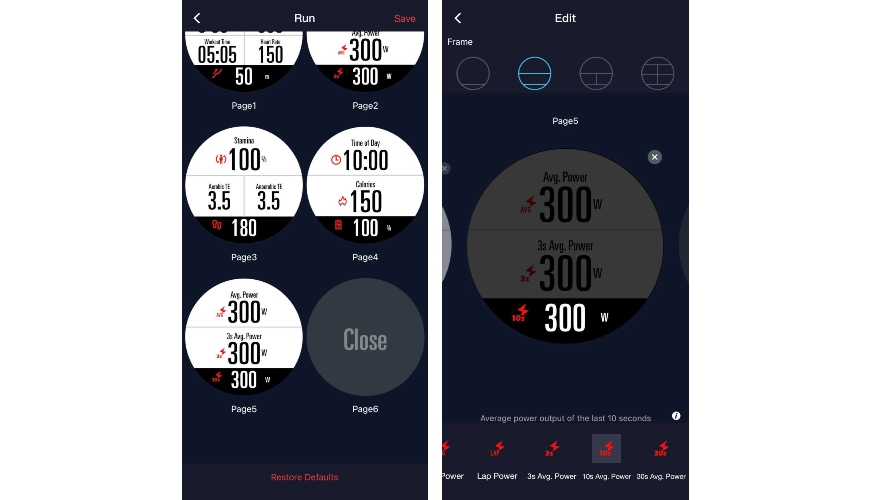
Even though I perhaps make it sound incredibly complicated to run according to power, its really quite as easy as to run according to pace or heart rate. And setting up watt-measurement on the watch is also incredibly easy. This is done in the app under the tab for setting up the time. You can either choose to get it shown as a data field instead of pace or - as I would recommend - make a new page where you can get a pure power-field shown. I chose my screenshot nr. 2 to show 1) current power, 2) average power for the whole workout and 3) 3sec. power. By showing the 3sec. power, the power-number doesn´t fluctuate as radically as the current one and this makes it easier to keep a more constant power if that is what you want.

If you use the Stryd-power measurement, it will of course be possible to get the Stryd data shown directly on the watch. However, I didn´t test this as I don´t have a Stryd-watt meter.
Planning your training with the COROS-app
Besides measuring running power, COROS Pace 2 also has another great feature, training planning/-calandar. This means that it is both possible to create a training plan, including which days you want to work out, which type of training you want to do, etc.. but actually also to share the training plan with others. You can share it by means of a link or by scanning the QR-code shown at sharing. However, its important to point out, that you can only share your training-plan with other COROS-users!
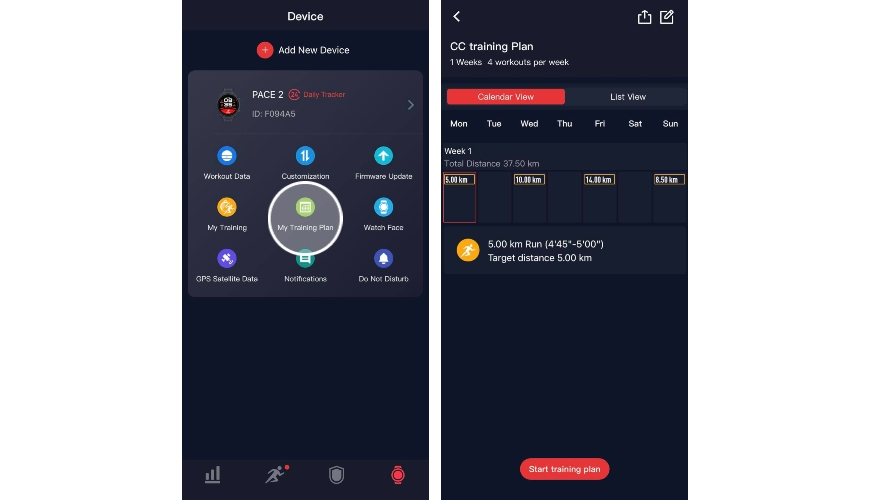
Creating the training plan is quite simple. I have actually never done this type of training planning before, neither on the watch nor on an app (like in Garmin) but always planned my training via TrainingPeaks, remembered the session in question and started running. But it is actually very smart and cool when you can do it directly from the app, synchronize with the watch and woops, you can just unwind and run according to what the watch tells you to do. In that way the watch can act as your coach, keeping an eye on pace/power/distance etc...
Via the app its possible to make individual, specific training sessions if you want to do intervals, pacy blocks, progressive running or something different.
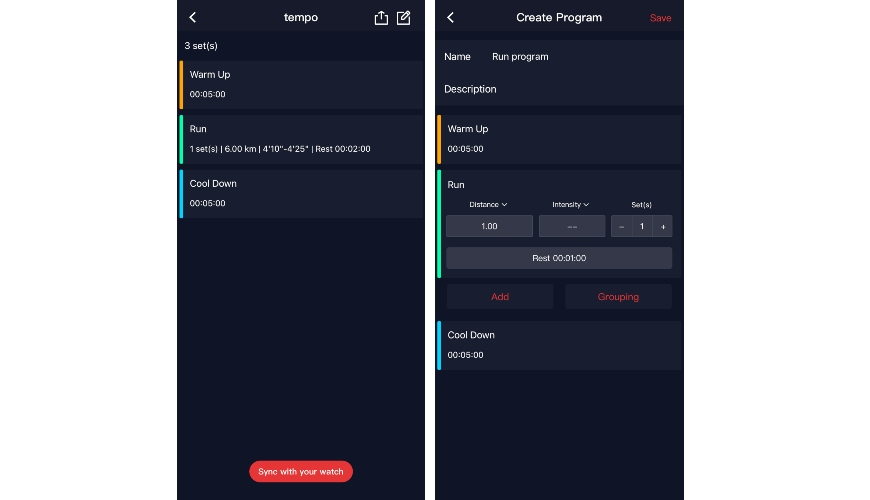
Its also possible to make your own training plan, i.e. a calendar where you plan your own training for the next weeks (or another period). To illustrate how this is done in the easiest way, I have done a small video. See below.
The training plan will subsequently be shown as seen below on the watch. To complete the planned training, simply choose "training session of the day" and press start. Then the session will start and the watch will during your session provide small notifications/vibrations if you are running faster or slower than planned.


COROS Pace 2 is the watch for the athlete who wants the best running watch at a great price!
As I started off by saying COROS Pace 2 is a serious GPS-watch which can really challenge Garmin. The watch has so many interesting and superb features which clearly outweighs the small points of cf criticism that I have for the watch. It has become the watch for my daily training - and if COROS was to satisfy me 110%, they only needed to add the feature with music playback directly from the watch.
It is a terrific GPS-watch which will help you in your daily training and help you beat personal records at races. With its completely unique power measurement directly from the watch, your training can reach new heights as well as your insight into your benefits of training. Even though the watch has a couple of features which is mostly targeted for the experienced runner - power - the watch is at least as cool for the exercise runner, who wants the lightest GPS-watch in the market with the most important features and not least a phenomenal battery life at an amazing price.
More inspiration?
Find further articles in our universe of inspiration right here: